
Customer came back? One click handles it.
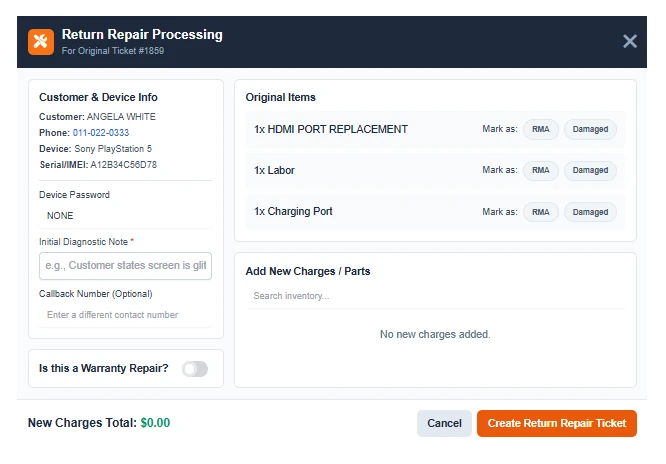
When a repair needs to come back — warranty or not — the Return Repair modal pulls the original ticket and carries over all customer, device, and part info instantly.
Full-Context Return Modal.
Click “Return Repair” on any completed ticket and the system pulls in everything — customer contact, device details, serial/IMEI, and original parts list. No retyping required.
Tag & Charge.
Mark original items as RMA or Damaged for supplier tracking while searching your inventory live to add replacement parts. Toggle the warranty status to cleanly separate paid work from claims.
Systemic Accountability.
Mandatory Notes
Every return requires an initial diagnostic note (e.g. “Screen glitching”) so your techs always have context on the comeback.
Callback Sync
Optional callback field with auto-formatting allows customers to provide a temporary contact number specifically for the return.
Linked History
The new ticket is permanently linked to the original repair, creating a flawless audit trail of the device lifecycle.
Manual Returns
- X
Re-entering customer and device info from scratch - X
No link between original and return tickets - X
Warranty work mixed with paid repairs
With Return Repairs
- ✓
Auto-populated info from original ticket - ✓
Linked tickets for complete service history - ✓
Warranty toggle cleanly separates work types